
Delivery via a parcel locker. Make sure you know all about it!


3 June 2025
There’s no denying that Paczkomat is hugely popular. There are currently thousands of them across Poland, and we’re launching new ones every day! However, we’re not resting on our laurels; we’re working hard to meet our customers’ expectations and introducing more and more features to make both collecting and sending parcels simple and enjoyable! Find out if there’s anything you don’t know about InPost Parcel Lockers!
We launched our first parcel locker in 2009 in Kraków. Since then, both the number of machines and the number of people using them have grown impressively. With the InPost Parcel Locker, you can not only collect but also post your parcels. It’s a very convenient option, meaning that in both cases you don’t have to wait for a delivery courier, nor do you have to queue at the post office or a parcel drop-off point. The parcel locker was designed for people who value their time and convenience.
Importantly, many devices operate 24/7, which offers considerable flexibility when planning deliveries outside standard opening hours. If you’re interested in posting a parcel on Saturday, A parcel locker is often the most convenient option.
Dimensions of the parcels on offer
At InPost parcel lockers, you can post parcels in three different sizes:
- XS size (maximum dimensions 4x23x40 cm, maximum weight 3 kg). This size is only available on the InPost Mobile app,
- Size A (maximum dimensions 8x38x64 cm, maximum weight 25 kg),
- Size B (maximum dimensions 19x38x64 cm, maximum weight 25 kg)),
- Size C (maximum dimensions 41x38x64 cm, maximum weight 25 kg)).
 Send a parcel
Got a parcel to send? Ship it quickly and conveniently through any Paczkomat® machine.
Just a few moments and your parcel is sent!
How do I send parcels via Paczkomat?
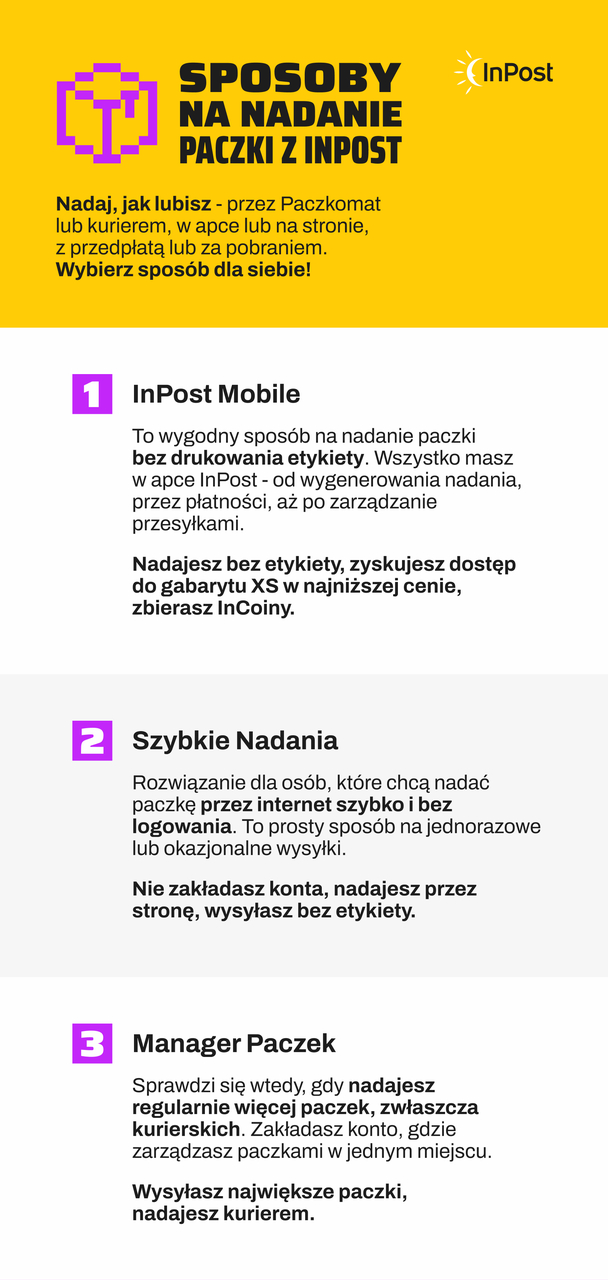
There are currently as many as three options for posting parcels using InPost Paczkomat machines:
-
InPost Mobile app
The third option is to post a parcel using the InPost app Mobile. This is a convenient solution that allows you to prepare your parcel without having to print and stick on a label. As with the other methods, start by packing your parcel properly and checking its dimensions so that you can choose the right-sized locker.
Once your parcel is ready, open the InPost Mobile app and select the ‘Send a parcel’ option. Then specify the parcel’s size and delivery method, and enter your details and those of the recipient. Once you’ve checked that the information is correct, proceed to payment.
Once you’ve paid for your parcel, a tracking code and a QR code will appear in the app. You don’t need to print the label or stick it on the parcel – simply go to your chosen Paczkomat parcel locker. At the machine, you can open the locker remotely via the app, scan the QR code or enter the tracking code on the machine’s screen. Then place the parcel in the locker, close it and confirm the dispatch.
-
Express Shipments
As the name suggests, this is a quick way to post your parcel. Before you get started, make sure you pack your parcel properly – you can use our cardboard boxes, which we provide for customers in various sizes, or your own packaging. Once you’ve packed your parcel, measure it carefully so you can choose a locker of the right size.
Once your parcel is packed, go to the InPost website and click on the ‘Quick Shipments’ tab. In the next step, you’ll need to fill in the form provided there. First of all, select the delivery method (Parcel Locker → Parcel Locker or Parcel Locker → Courier) and the parcel size.
In the next section, enter your details and those of the recipient, and select the Parcel Locker where the parcel will be delivered (if you’re choosing this delivery method). In the summary, you can check the cost of the parcel you are sending. Once you have confirmed that the details are correct, pay for your parcel, then print and stick on the label.
All you have to do now is post your parcel via the Parcel Locker of your choice! Please note that you don’t need to create an account in our system to use this option.

-
Parcel Manager
The second option allows you to send a parcel using the Parcel Manager. This method requires you to have an account, but you can set one up quickly and free of charge! Start the sending process by packing your parcel. Next, log in to https://manager.paczkomaty.pl and generate a waybill in the ‘Send parcels’ tab by entering the relevant details.
In the next step, you need to pay for the parcel and print out the label. Affix it to a well-packed and securely sealed parcel. Now all you have to do is take it to the designated Paczkomat parcel locker (you can also choose the courier collection option)! At the parcel locker, scan the parcel number and enter the code from the label on the screen.
Weekend Parcel
We have recently added a new service to our range, offering parcel delivery at weekends too! This option is primarily intended for business customers who run their own e-commerce businesses. Thanks to this service, parcels sent to customers can be delivered to a Paczkomat parcel locker on Saturdays and Sundays as well!
This offer is available at a very attractive price. With the option of weekend delivery, you’re sure to gain a loyal customer base who’ll be able to receive their parcels in no time at all. The service is free of charge until the end of April.


