Integrating InPost with Prosta Paczka – how to speed up warehouse operations and reduce dispatch times?
For business E-commerce

28 June 2026
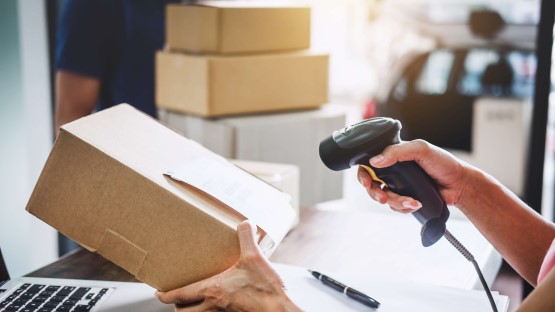
A faulty parcel received by the buyer usually originates in the warehouse, during manual order picking. The integration of InPost with Prosta Paczka links this stage to dispatch: you scan the products as you pack them, and once completeness has been confirmed, the courier label is printed straight away. The tool acts as a link between the warehouse system and the courier’s services, so order and customer data don’t have to be manually transferred between programmes. Let only what has actually been packed into the box leave the warehouse!
Prosta Paczka and InPost – what this partnership offers:
-
Picking with a scanner - Checking the contents of a parcel before dispatch reduces the risk of errors.
-
Integration via the ShipX API - To get started, you’ll need your organisation ID and an access token from the Package Manager.
-
The role of the integrator - The tool integrates sales and stock management systems with InPost’s logistics services.
-
Labels and manifests in bulk - The consignment documents are generated from the order details, and you provide the courier with a summary report.
-
Tracking and dispatch history - The statuses are returned to the dashboard, and all consignment notes remain in a single database.
 Check out Business Subscriptions
Running a business? Sending many parcels a month? Save on shipping with InPost! Our diverse offer makes it the perfect solution for both small and large companies.
Discover our full range of Subscriptions and submit your inquiry.
What does the integration of InPost with the Prosta Paczka programme offer?
The integration of InPost with the Prosta Paczka programme allows you to send parcels via courier or to collection points, i.e. Paczkomat parcel lockers operating 24 hours a day, directly from the order management panel. The system automatically selects the service based on the order details, so you don’t have to set the delivery method manually for each parcel. You can manage your shipments right where you’re already selling.
The package also includes dedicated e-commerce services, such as Allegro Paczkomat InPost and Allegro Kurier24 InPost, which are useful when selling on auction platforms. The seller creates dispatch templates for recurring orders and carries out delivery method mapping, i.e. linking the options selected by the customer in the shop to specific delivery services. The better the delivery methods are tailored to your needs, the fewer adjustments you’ll need to make when sending parcels on a daily basis.
What does the integration offer in terms of managing shipments:
-
Dispatch via parcel locker and courier - delivery to a postbox or to a specified address via a single portal.
-
Dispatch templates - pre-set configurations for recurring shipment types.
-
Additional services - for example, ‘Weekend Delivery’ for orders placed at the end of the week.
Before you notify the courier – that is, before you arrange for the parcel to be collected – you can still edit the consignment note and correct the details before they are sent to the courier. This is handy if the delivery address or the dimensions of the parcel change. Check at the start which delivery options you want to show your customers.

How do I set up a connection to the InPost ShipX API?
You configure the connection by The InPost ShipX API: the operator’s modern application programming interface, which replaces older technical solutions for data exchange. The entire setup process simply involves entering your access details in the Prosta Paczka dashboard. Without this step, the tool cannot authorise consignments on the InPost network.
For it to work properly, you need two parameters: the organisation ID and the access token, i.e. the API key. You can retrieve both from the Parcel Manager – the InPost online service where you manage your sender account. It is these authorisation details that link the shop to the operator’s services.
Where can I get the authorisation details?
You generate the organisation ID and access token in the Parcel Manager dashboard, in the section for carrier APIs. Before implementation, it is worth testing the integration in a test environment – the sandbox – where you can verify the connection without incurring any actual dispatch costs. Only after a successful test switch the configuration to production mode and start shipping. Make sure you enter the correct set of parameters for the environment in question, as mixing up the modes is a common cause of errors at the start.
How can ERP systems be integrated with InPost’s logistics services?
Prosta Paczka serves as an integrator that connects ERP and warehouse systems with InPost’s logistics services. In practice, the tool acts as an intermediary between the programme you use to manage sales and stock levels and the operator’s delivery network. This ensures that order processing and dispatch operate using a shared set of data, without the need to re-enter it between applications.
Integration It supports popular sales and stock management software and retrieves order and customer data directly from their databases. Courier orders are therefore generated automatically on the basis of stock and sales documents, rather than from manually completed forms. This is where parcel preparation is accelerated the most, as information about goods sold is immediately converted into a ready-to-dispatch consignment.
What does the integrator handle in the data flow:
-
Order collection - Order and customer data is retrieved directly from the system’s database.
-
Source documents - Shipments are created on the basis of stock and sales documents.
-
Data transfer - Information is exchanged between the system and the operator without the need for manual transcription.
-
Order automation - Once an item has been sold, it is immediately converted into a courier order.
How can you automate the generation of labels and waybills?
Labels are generated directly from the management panel, without having to log in to the operator’s external websites. Once the label has been issued, the system automatically forwards the consignment note number to the sales platform, so the buyer can see the parcel linked to their order. The entire document workflow is handled in one place.
When printing The tool takes into account the parcel’s dimensions, the weight of the consignment and the automatic selection of packaging, ensuring that the shipping documents match what you are actually sending. You can prepare labels individually for urgent consignments or in bulk for the entire batch from a given day. At the end of the day, the tool generates what is known as a courier manifest – a summary record of parcel handover. This bulk labelling and a single set of documents for the entire batchThese measures actually reduce the time taken to process daily consignments.
How does the order fulfilment module with a barcode scanner work?
The picking module is a mechanism that checks that goods have been packed correctly in the warehouse, before the parcel is sent to the customer. Whilst packing, you scan the product barcodes and the system compares them with the list of items on the order. This eliminates the risk of sending an incomplete order – that is, a situation where the box contains too few items or the wrong goods.
A successful verification completes the entire dispatch process: once the order has been confirmed as complete, the module can automatically trigger the printing of an InPost courier label. Packing and dispatch are therefore combined into a single step at the workstation. Please note that it is this step in particular that most effectively reduces complaints arising from errors in the contents.
How can I track the status of my parcels and manage my dispatch history?
You can track the status of your parcels in real time directly in the user dashboard, so your staff can immediately see what stage each parcel is at. A tracking number is assigned to each order, allowing you to monitor deliveries without having to search for the parcel within the system. The delivery status updates automatically as the parcel progresses through the delivery process.
The notifications module is responsible for communicating with the customer; it sends personalised emails containing a link to track the parcel. The customer receives automatic updates on dispatch and subsequent stages of the process, without the need for the shop’s staff to intervene.
What does the monitoring and handling of consignments involve:
-
Real-time status - a preview of the delivery stage directly in the user dashboard.
-
Tracking number for the order - assigned to the parcel, without having to search for it in the system.
-
Email notifications - messages to the recipient containing a link to track the parcel.
-
Broadcast history - all consignment notes compiled in a single database.
-
Reprint - access to previous documents when processing returns.
-
Status update - changing the delivery stage without manual intervention.
What does access to the broadcast history provide?
Broadcast history collects all the prepared consignment notes in a single databaseSo, you have every previous order to hand. This makes it easier to manage returns and reprint labels if a parcel is returned or a document goes missing – your shipment history remains permanently in the dashboard, so you can access your dispatch details at any time.
This whole integration process pays off most where it matters most: ensuring that the customer receives exactly what they ordered. Scanning during order fulfilment checks the contents, the label is generated from the order details, and the delivery status and notifications are sent to the buyer automatically in the background. When packing and dispatch operate as a single process, there is more peace of mind to focus on the sale itself.
Choose InPost Subscriptions for businesses and send parcels at a fixed price.
Take one minute to leave your contact details and start sending parcels from as low as 11.89 PLN*.
- One contract for courier and Paczkomat shipments
- Free courier pickups
- Express delivery
- Price guarantee for the duration of the contract
- Fuel surcharge included
- Dedicated post-sale support
* Net price per Paczkomat shipment in the Subscription 600 plan.
Czytaj również